Knox Manage 26.06 release notes (original console)
Last updated June 17th, 2026
New
Administer directory resources with Google Workspace
Knox Manage can now sync directory resources, such as users and groups, from your Google Admin Console to your tenant. Users can then enroll and sign into Android Enterprise or Android Management API (AMAPI) devices with their managed Google accounts. To link your Google Admin Console, go to Setting > Android > Google Workspace.
This integration is available if you registered your Android Enterprise environment with a Managed Google Domain account only, not a personal one. You can check what account you’re registered with by going to Setting > Android > Android Enterprise. Your account type displays beside Enterprise Type.
Introducing Bulk eSIM Management
The Bulk eSIM Management page is newly added to Knox Manage. Here, you can upload and manage your eSIM activation codes, and then activate them on your devices — providing you with centralized control over the connectivity of your device fleet.
Simply upload a list of eSIM activation codes and device IMEIs that you want to associate the activation codes with. Each activation code-IMEI pair displays on the Bulk eSIM Management page, where you can choose to activate an eSIM on its associated device at any time by clicking Activate eSIM. To learn more, see Manage eSIMs.
To deactivate an eSIM, use the Remove eSIM Cellular Plan device command and select from installed eSIMs on the device. To learn more, see Android Enterprise device commands.
Auto-collect Embedded Identity Document (EID) numbers
An Embedded Identity Document (EID) number is a unique 32-digit identifier that is assigned to the eSIM chip of a device. Carriers use the EID to download and activate eSIMs securely.
From the 26.06 release, EID is automatically collected on fully managed devices and work profile on company-owned devices, and can be collected on work profile on personally-owned devices. You can now view a device’s EID by viewing the device details panel, selecting it as an additional column on the Device page, or exporting your device list to Excel. To learn more, see View details of a device.
Enhancements to the Knox Manage agent’s interface and navigation
With this release, the interface of the Knox Manage agent is redesigned for easier navigation. Device users can now access all of its functions, such as assigned content and settings, from the agent’s home screen. See navigate the Knox Manage agent to learn more.
New troubleshooting options also provide the agent with added functionality. For instance, Debug mode collects additional data to send to IT admins once users reproduce issues on their devices. Additionally, if users experience issues during enrollment, such as a lagging screen, a notification now displays on their device screen. Users can tap it to launch the Knox Manage agent early in the enrollment process and access its troubleshooting functions.
New Android Enterprise policies
The following policies have been added in 26.06. Previously, these policies were available for Samsung devices only.
You can configure policies from Profile > profile name > Modify Policy. See Android Enterprise policies.
| Platform | Setting | Description |
|---|---|---|
| Android Enterprise | Boot Animation | Configures the device boot animation. |
| Android Enterprise | Shutdown Animation | Configures the device shutdown animation. |
| Android Enterprise | Block components from running in certain apps | Blocks selected components, such as activities or receivers, from a specific app. |
| Android Enterprise | Block use of certain hardware keys | Blocks the use of selected hardware keys when the device is in kiosk mode. |
| Android Enterprise | Wi-Fi Direct | Allows Wi-Fi Direct (Wi-Fi P2P) connection. |
| Android Enterprise | Wi-Fi SSID Allowlist Setting | Allows devices to connect to the specified Wi-Fi APs. |
| Android Enterprise | Wi-Fi SSID Blocklist Setting | Blocks devices from connecting to the specified Wi-Fi APs. |
App data and cache management for Multi app kiosks
You can now clear the app data and cache of specific apps on your Multi Apps Mode kiosk device, helping you maintain data privacy when multiple users share the kiosk device. To learn more, see Kiosk Wizard menu items.
New iOS custom policy settings
You can now configure custom settings using XML payload to deploy iOS policies even if they aren’t natively supported as inbuilt policies in Knox Manage. To learn more, see iOS policies.
New iOS disallow application uninstallation option
By default, iOS device users can uninstall apps on their devices. With the 26.06 release, you can disable this permission during the Assign Application process so that iOS device users can’t uninstall any public apps, internal apps, or Volume Purchase Program (VPP) apps from their device. With this permission disabled, you can still delete an app with a device command. To learn more, see Assign iOS App Store applications.
Send device commands for iPhone and iPad groups
Previously, you could only send device commands to iPhone and iPad devices. With the 26.06 release, you can now send commands directly to groups comprised of User enrollment iPhones and iPads, as well as Shared iPads, allowing you to manage more of your devices in one action. To learn more, see Manage shared iPads.
Introducing extended reality (XR) devices
As of 26.06, Knox Manage now supports Extended Reality (XR) devices. XR devices can be enrolled as fully managed devices through the token or QR code methods. For this release, XR device management is limited to specific features and Android Enterprise policies, but more features are planned for the future. See Supported features to learn more.
Updates
Updated permission to switch between consoles
Previously, super admins could access the Knox Manage settings in the Knox Admin Portal from their profile icon > Settings, and switch between the new and original consoles. With this release, only the super admin who created the Knox Manage tenant can access these settings — GENERAL SETTINGS, DEFAULT SUPPORT INFORMATION, ANDROID ENTERPRISE, and USER EMAIL TEMPLATES — and switch between consoles.
Update to supported Android version
Previously, the Knox Manage agent on a device supported Android 11 or higher. With the 26.06 release, the Knox Manage agent now supports Android 12 or higher.
Admin management changes
Previously, you managed admin permissions in the original console, regardless of what console admins used. With this release, admin permissions are managed separately between the original and new consoles. Permissions set in the original console, only apply to admins when they use the original console. As a result, you must configure different permissions in the new console if you want admins to access it. See Add and modify administrators to learn more.
Update to supported iOS and iPadOS versions
Previously, the Knox Manage agent on a device supported iOS and iPadOS 16 or higher. With the 26.06 release, the Knox Manage agent now supports iOS and iPadOS 18 or higher.
Update to supported macOS version
Previously, the Knox Manage agent on a device supported macOS 13 (Ventura) or higher. With the 26.06 release, the Knox Manage agent now supports macOS 14 (Sonoma) or higher.
Update to Samsung Cloud Connector (SCC) client and server version
Previously, the Samsung Cloud Connector (SCC) client version was 25.11 (2.8.1), matching the server version of 25.11. With the 26.06 release, the SCC client and server versions have been updated to 26.06.
With these updates, various prerequisites to install the client have also been updated, including the minimum supported version for the Java Development Kit (JDK), as well as limitations for SCC server 26.06 access for certain older versions of the SCC client. See Prerequisites for installing SCC and Install the SCC client to learn more.
Increased security on API client token validity period
Previously, the maximum API client token validity period was near-infinite. For increased security, the maximum period is now 1 hour (3600 seconds). To learn more, see Manage API clients.
Update to device search behavior
Previously, you could search for a device in Knox Manage by partially entering an IMEI or serial number. Starting with 26.06, the partial search functionality is no longer available for enhanced security. However, you can continue to search for a device with its full IMEI or serial number.
New nested depth for sub-organizations
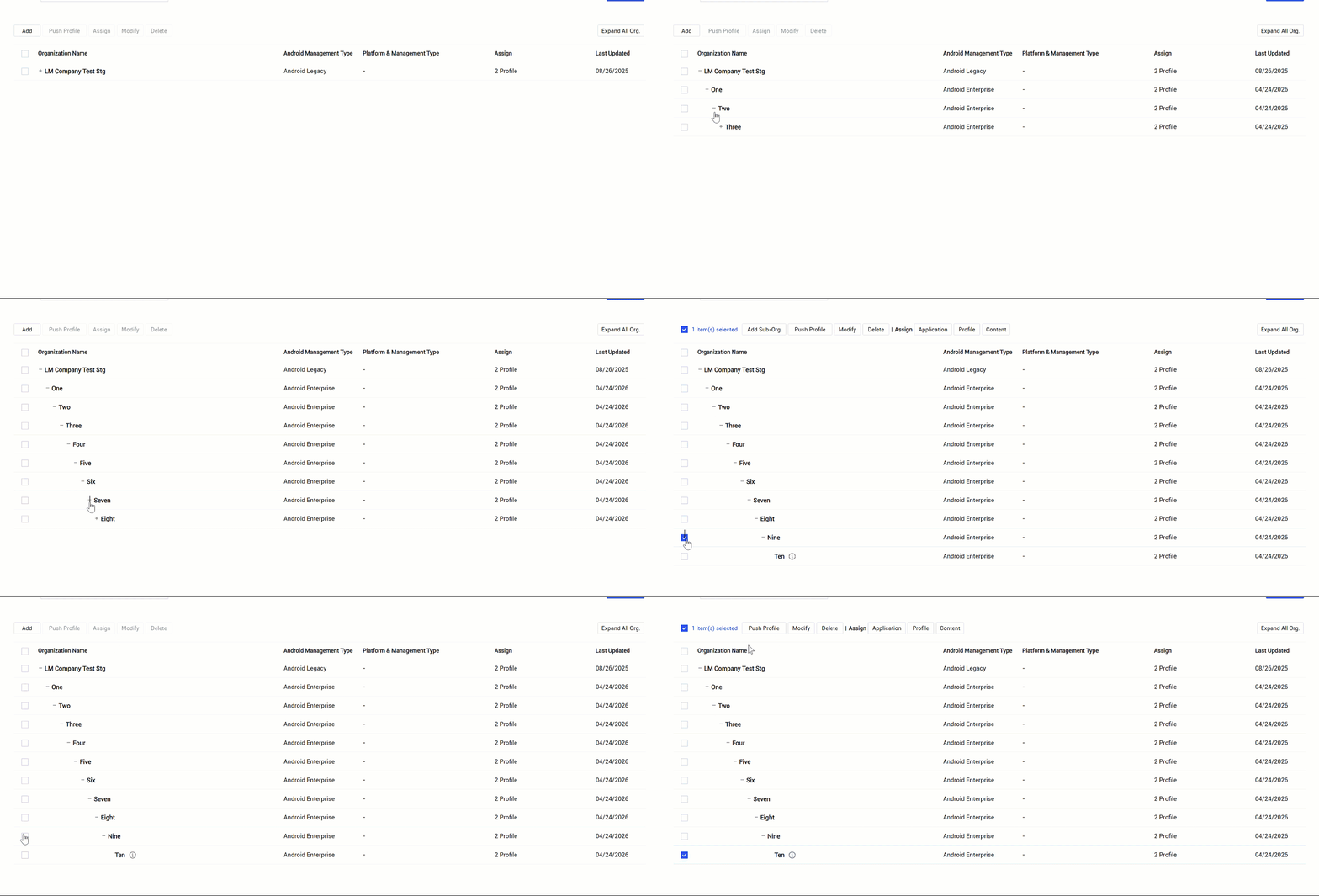
From the root organization, the parent organization created with your tenant, you can add up to ten levels of sub-organizations. If you created a sub-organization called Human resources under the root organization, it would be level one. If you created another sub-organization under Human resources called Payroll, that would be level two. Sub-organizations that were created before 26.06, or are synced from a directory, aren’t impacted by this change.
Deprecation
Android Legacy deprecation for existing devices
Previously, Knox Manage deprecated support for Android Legacy devices, meaning they could no longer enroll in Knox Manage. In an upcoming release, the Knox Manage agent will no longer be supported on Android Legacy devices. The Knox Manage team strongly recommends that you migrate to the latest Android Enterprise platform.
For detailed information about migrating your device fleet, see the Android Legacy to Android Enterprise migration guide.
Deprecation of the fully managed with work profile management type
Knox Manage no longer allows devices to be enrolled as the fully managed with work profile management type. There is no impact on devices that are currently enrolled as this management type.
Notice of deprecation of iOS policies
With the 26.06 release, the following policies are removed for unsupervised - Device enrollment and User enrollment devices.
| Category | Policy name |
|---|---|
| App Restrictions | Inappropriate contents download on iBookstore |
| iTunes Store > Explicit content on music and podcasts | |
| In-app purchase | |
| Browser | Cookies |
| Block pop-ups | |
| iCloud | Backup |
| Handoff | |
| Document synchronization | |
| Keychain synchronization | |
| iCloud Photo Library | |
| Photo Sharing | |
| Media | Rating for Each Country > Movies |
| Rating for Each Country > TV Shows | |
| Phone | Background Fetch for roaming |
| Security | Auto Unlock |
| Screen Unlock with Biometric ID | |
| System | Camera |
| Result of web search with Spotlight |
Notice of end to SCC server access for SCC client version 2.3.1 or earlier on JDK version 1.8.0_261 or higher
Due to enhanced security protocols, if your SCC client version is 2.3.1 or earlier on JDK version 1.8.0_261 or higher, you won’t be able to access SCC server 26.06. For security and system stability, we strongly recommend using SCC client version 26.06. See Prerequisites for installing SCC and Install the SCC client to learn more.
Pre-notice of deprecation of older SCC client versions
SCC client versions 2.5.2 and lower are scheduled to be deprecated in 2H 2027. To learn about how to update to the newest version of the SCC client, see Run and manage the SCC client.
Pre-notice of deprecation of report output fields
The Data Roaming and Voice Roaming report output fields are scheduled to be deprecated with the 26.10 release as they aren’t managed by Knox Manage, and may result in inaccurate information. Any reports that feature only these fields will be removed when these fields are deprecated.
Policy deprecations
With the 26.06 release the following policies are deprecated. If you already set these policies in existing profiles or devices, they aren’t impacted.
- Android Enterprise > Wi-Fi > Security type: WEP (Deprecated)
- iOS > VPN > Connection type: IKEv2 > Diffie Hellman Group > IKE SA, Subordinate SA > 0 (Deprecated)
On this page
Is this page helpful?