Exit Kiosk mode
Last updated April 29th, 2026
You can take a user’s device out of any type of Kiosk mode — Multi-app, Single-app App, or Web — without changing or removing the Kiosk device profile. Doing so enables the device to be used outside of kiosk mode, but your kiosk policies remain applied.
To exit kiosk mode permanently, you must unassign your kiosk profile from your device’s group, and then assign another profile to it. Alternatively, you can assign another profile with higher priority to your device’s group. To learn more about how to assign and unassign profiles from groups, see Manage profile assignment.
Exit kiosk by sending a device command
For a device that is successfully communicating with the server, you can send a device command to exit Kiosk mode.
To do this:
-
On the Devices page, select the device that you want to exit Kiosk mode from.
-
Click ACTIONS > Perform action on device. The Perform action on device dialog opens.
-
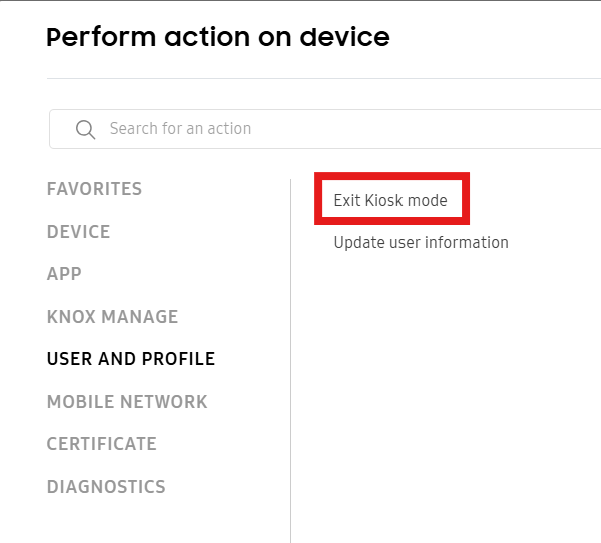
Click USER AND PROFILE > Exit Kiosk mode.
-
On the Exit Kiosk mode dialog that opens, click Confirm. The device exits Kiosk mode.
To re-enter Kiosk mode, you must apply a profile update to the device. For more information about sending device commands, see Perform actions on devices.
Exit kiosk by sending an exit code
You can give a device user an Exit kiosk code for them to exit kiosk mode on their device. This procedure can be performed regardless of server communication issues.
This method won’t work when the Hide info icon policy is selected because the user must tap on the info icon (i) to enter the code.
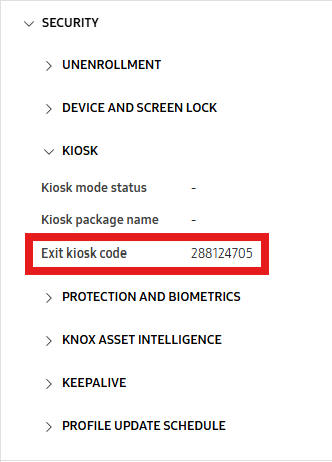
To do this, you must provide the Exit Kiosk Code to the device user. You can find the code by going to the Devices page, then clicking the name of the device currently in Kiosk mode. The sliding panel opens. Click SECURITY > KIOSK and find the Exit kiosk code.
After the device user receives the code, they must:
- Tap the info icon (i) on their device.
- On the About Kiosk screen, tap Exit Kiosk.
- Enter the Exit kiosk code, then click OK. The device exits Kiosk mode.
To re-enter Kiosk mode, you must apply a profile update to the device.
On this page
Is this page helpful?