View content
Last updated January 22nd, 2024
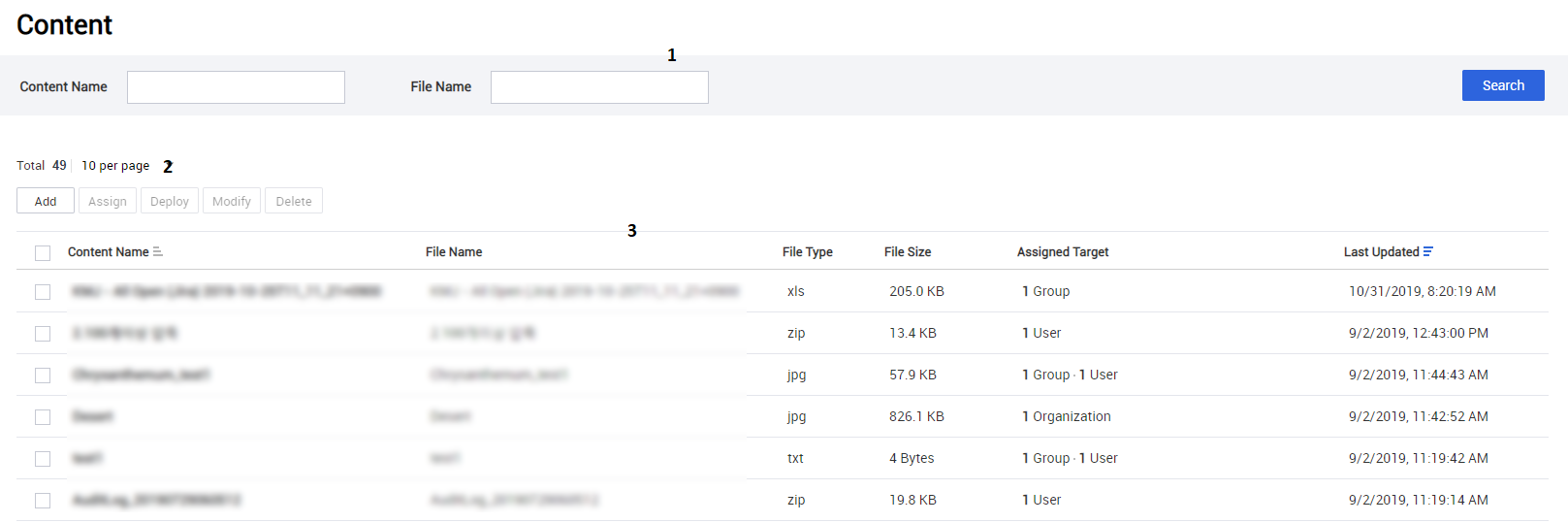
Navigate to the Content page to view details such as the content name, file type, assigned targets and more at a glance. You can also add, assign, and delete content on this page.
|
No. |
Name |
Description |
|
|
1 |
Search field |
Search for desired content. |
|
|
2 |
Function buttons |
Add |
Add new content to the list. For more information, see Add content. |
|
Assign |
Assign new content. For more information, see Assign content. |
||
|
Deploy |
Distribute new content. For more information, see Distribute content. |
||
|
Modify |
Modify the selected content details. For more information, see Modify content. |
||
|
Delete |
Delete the selected content. For more information, see Delete content. |
||
|
3 |
Content list |
View the brief information of the contents on the list. |
|
View content details
View each content details by clicking a content item’s name on the content list.
Summary area
The summary area contains information about the selected content, such as the file name, extension type, size, the date of the last update, and the deploy area.

Tab: Device
The Device tab shows a list of devices that the content was pushed to, including device details such as status, IMEI, and management type.
The following function button is available:
| Function buttons | Description |
|---|---|
| Refresh | Update the list of devices. |
Tab: Assigned Target
The Assigned Target tab shows the list of groups, organizations, users, and devices that the content was assigned to, and the last date when the content was assigned to the target devices. You can perform specific actions on the target devices you’ve selected.
The following function button is available:
| Function buttons | Description |
|---|---|
| Unassign | Revoke the content assign from the selected targets. |
Function buttons in the footer
You can perform specific functions on the content using the function buttons in the footer.
The following function buttons are available:
| Function buttons | Description |
|---|---|
| Back | Return to the content list. |
| Delete | Delete the content from the content list. The content already distributed on target devices is retained unless the user deletes it from the device. |
| Modify | Replace the content file or modify the content name or deploy area. |
| Assign | Assign the content to the target devices. |
| Deploy | Distribute the content to the target devices. |
On this page
Is this page helpful?