About Samsung Knox
Last updated September 21st, 2026
Samsung Knox combines hardware-backed security, Knox services, administrative tools, device apps, and SDKs to help companies securely manage enterprise devices throughout their lifecycle.
This topic explains the components of the Knox platform, how they work together, and the overall device management workflow.
Samsung Knox provides defense-grade security across multiple layers, from device hardware and platform security to device lifecycle management:
- Device hardware-backed security establishes a trusted security foundation at the device hardware level.
- Platform security with Knox services extends security across device firmware and software, with enterprise controls for policy management and compliance.
- Secure device lifecycle management with Knox services protects devices across their lifecycle, from initial enrollment to ongoing management and device retirement.
Components of the Knox platform
The Samsung Knox platform consists of the following key components:
-
Hardware-backed security: The Knox security built directly into Samsung Galaxy device hardware at manufacturing, providing a trusted foundation for data protection, secure boot, and hardware-rooted key management. This defense-in-depth architecture protects devices from the moment they power on.
-
Knox Suite: The Knox solutions designed to meet diverse business needs.
-
Knox services: Provide capabilities for device security, enrollment, management, firmware updates, device analytics, and support. Some Knox services are included in Knox Suite, while others are available separately.
-
Knox Suite Plans: License packages that bundle various Knox services. Higher-tier plans unlock more services. In addition to plans, standalone licenses are available for some services.
-
Knox Admin Portal: The web portal for accessing Knox cloud services and managing devices, licenses, and administrator accounts.
-
-
Knox SDKs and APIs: The developer tools that allow companies to integrate Knox security and device management features directly into custom apps and systems.
How Knox works
The various Samsung Knox components work together with identity and access management, device apps, and other technologies to securely manage enterprise devices.
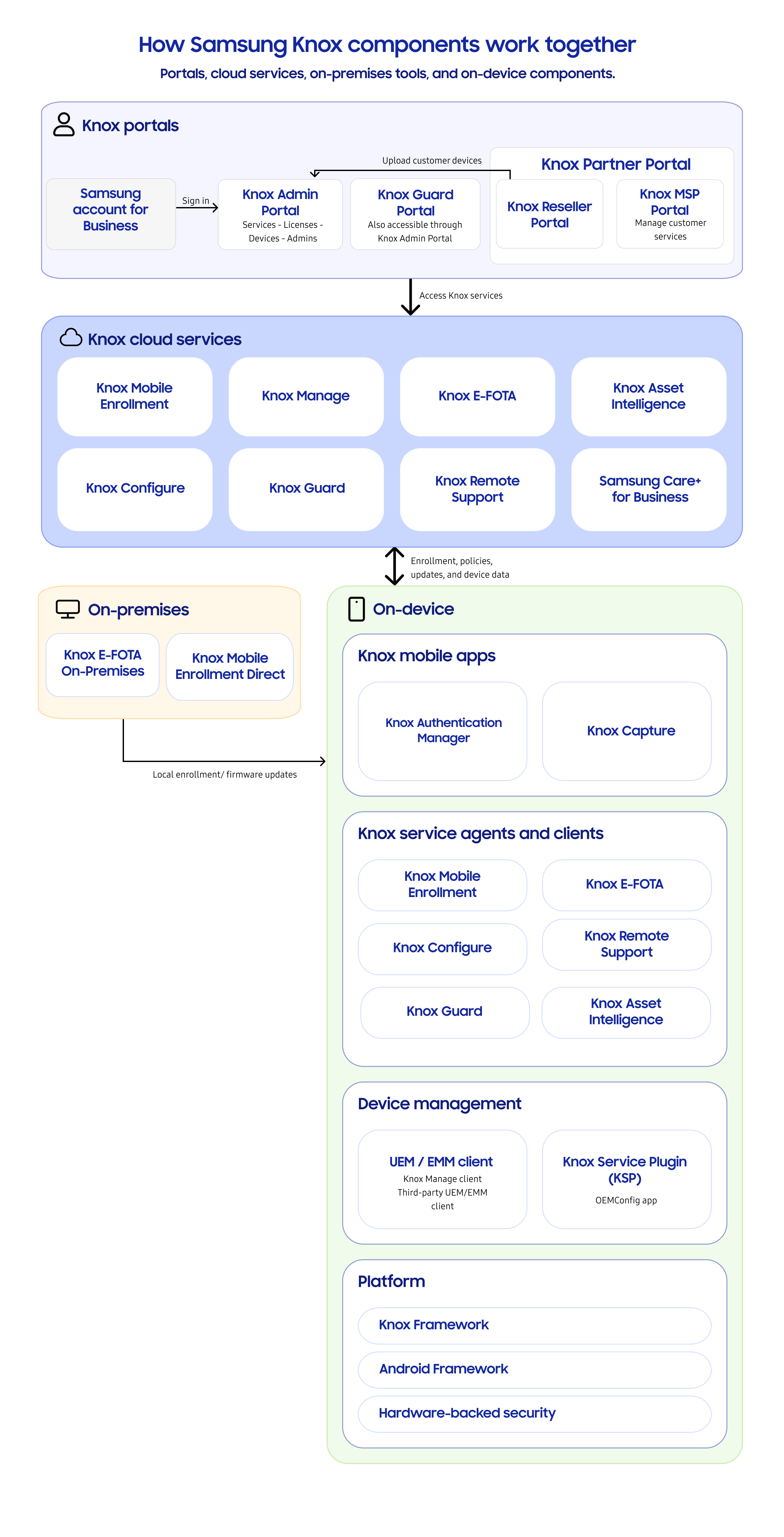
Overall, the Knox workflow includes the following components:
-
Samsung account for Business and identity providers: Authenticate users who access the Knox Admin Portal.
-
Knox Portals:
-
Knox Admin Portal: Central web interface for accessing and managing Knox cloud services, devices, licenses, and admins.
-
Knox Partner Portal: Web interface that allows partners to manage Knox services on behalf of customers.
-
-
Knox services: Cloud-based, on-premises, or device-based services that address specific business and device-management needs. Services can be available through Knox Suite Plans or separately using standalone licenses.
-
On-device components:
-
Knox mobile apps and service agents that apply configurations on Samsung Galaxy devices and communicate with Knox services.
-
Device management apps:
-
Knox Service Plugin: An app on Samsung Galaxy devices that applies Knox Platform for Enterprise policies configured using your enterprise mobility management (EMM) solution.
-
Knox Manage or other EMM apps: Apps that runs on managed devices, linking them to Knox cloud services for secure device management throughout their lifecycle.
-
-
-
Platform components: Knox framework, Android framework, and Knox platform that establish a secure foundation for device lifecycle management.
Device lifecycle management workflow
Knox supports the management of enterprise devices throughout their lifecycle, from initial administrative setup and device enrollment through ongoing management and eventual decommissioning.
The following figure illustrates the overall Knox device management workflow:
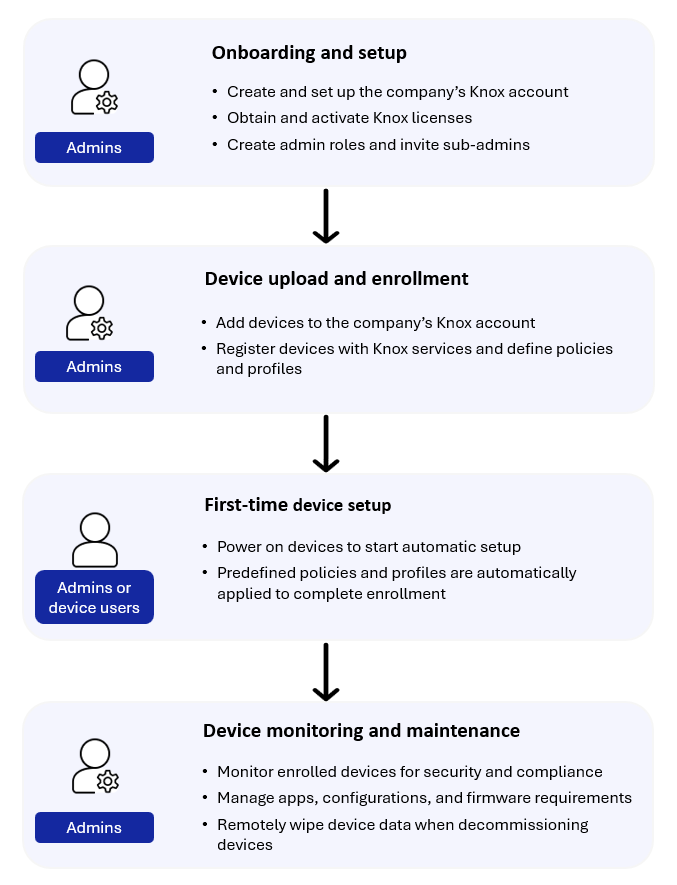
The overall steps of the workflow are:
-
Onboarding and setup by admins: Establish a foundation for secure device management before devices are enrolled. This includes:
- Creation and setup of a Knox account for the company.
- License generation or procurement and license activation.
- Creation of custom admin roles and inviting sub-admins.
-
Device upload, enrollment, and provisioning by admins: Add devices to the company’s Knox account, then provision and register the device to Knox services. This sets up the necessary policies and profiles on devices, ensuring they are ready for use by device users.
-
First time device setup by admins or device users: When admins or device users power on a device, all required, predefined policies and profiles are automatically applied and the device is automatically configured to complete enrollment.
-
Device monitoring and maintenance by admins: Track and monitor enrolled devices to ensure adherence to company’s security policies and compliance rules, such as app restrictions, password requirements, Wi-Fi, VPN, or email configurations, minimum firmware requirements, and device encryption status. When decommissioning devices, you can perform remote data wipe to securely erase device data.
On this page
Is this page helpful?