Knox Admin Portal 26.06 release notes
Last updated June 17th, 2026
New
Support for Android 12
Starting from KCS 26.06, the minimum supported OS version for Knox cloud services is Android 12.
New tile and dashboard for device lifecycle and security monitoring (Labs)
The Knox Admin Portal 26.06 release introduces a new Device lifecycle summary tile on the Dashboard, providing an easy way to track security status and lifecycle metrics across your fleet of devices.
Clicking the tile opens the new Security dashboard, which offers detailed security and lifecycle analytics for your device fleet. It also includes OS and security patch data from Knox E-FOTA and fleet vulnerability and integrity details from Knox Asset Intelligence.
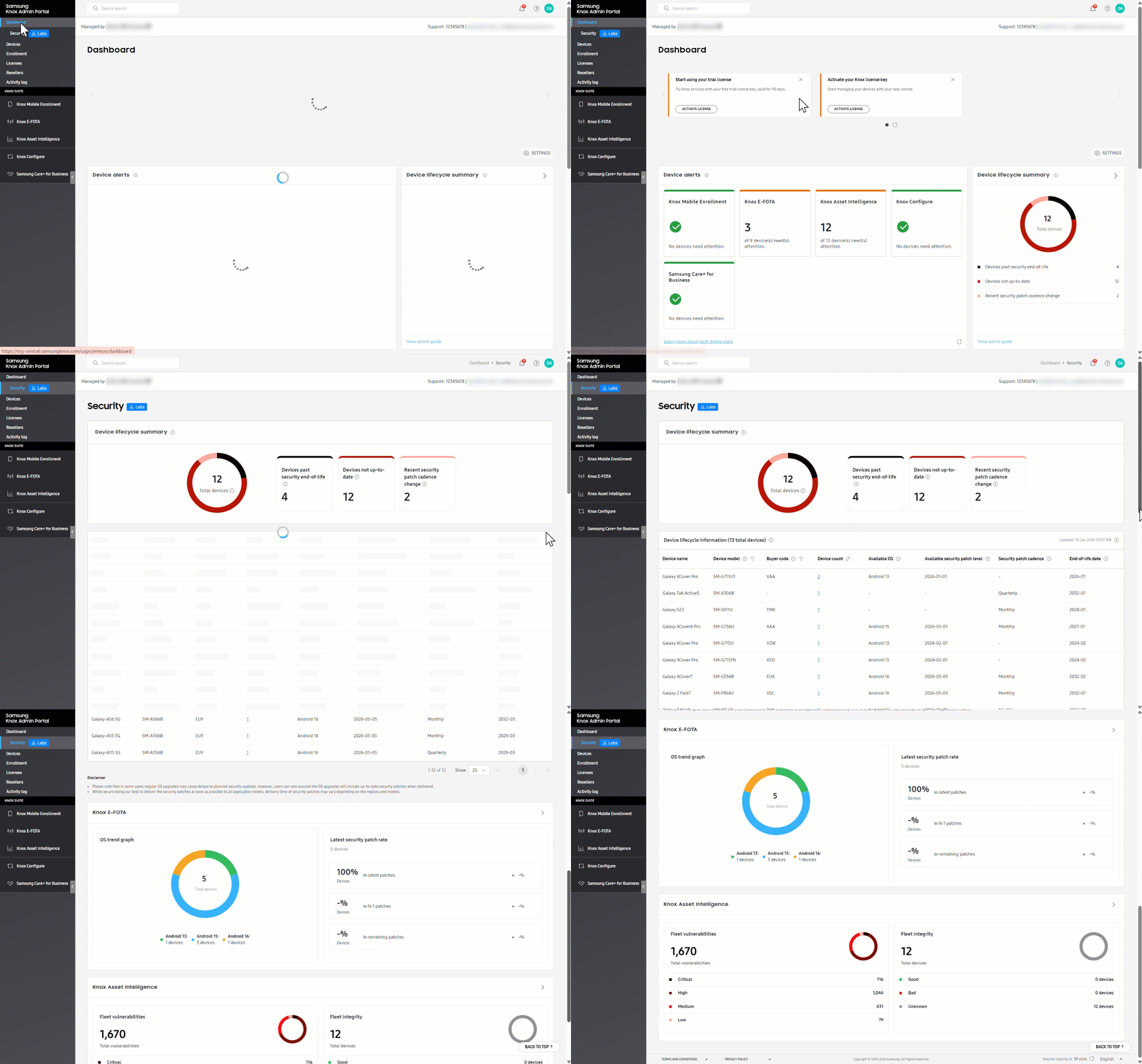
Additionally, you can now enable periodic email notifications for security lifecycle alerts in the Email preferences page > General Settings section. For more information, see Security dashboard and Customize the portal.
Centralized management of EMM credentials
Previously, EMM credentials were managed in the Knox Mobile Enrollment console. With the 26.06 release, a new EMM CREDENTIALS tab is added to the Enrollment page, allowing you to manage EMM user ID and passwords without navigating to the Knox Mobile Enrollment console. For more information, see Manage EMM credentials.
New actions and role permissions
With this release, you can use the updated Actions menu in the common device list to assign EMM credentials and enroll devices without navigating to service-specific consoles. The Actions menu on the Enrollment page is also updated to manage EMM credentials.
New permissions for these actions are now available on the ROLES tab. Additionally, the common Profiles section on the tab is now renamed to Enrollment.
| New actions | New Common permission |
|---|---|
| Enrollment page > Add EMM credentials, Edit EMM credentials | Enrollment > Manage enrollment settings > EMM credentials > Create and edit |
| Enrollment page > Delete EMM credentials | Enrollment > Manage enrollment settings > EMM credentials > Delete |
| Devices page > Enroll devices in services | Devices > Manage devices > Enroll devices in services |
| Devices page > Assign EMM credentials | Devices > Manage devices > Assign/Unassign EMM credentials |
For information about the common actions and their related roles, see Manage devices and Manage roles.
Service-specific actions added to the Devices page
You can now perform the following service-specific actions directly from the common device list, eliminating the need to navigate to other service consoles.
| Knox cloud service | New actions added to common device list |
|---|---|
| Knox Mobile Enrollment |
|
| Knox E-FOTA |
|
| Knox Asset Intelligence |
|
| Knox Configure |
|
Bulk actions available from the Devices page
This release introduces new common and service-specific bulk actions in the BULK tab on the Devices page.
| Knox cloud service | New bulk actions |
|---|---|
| Common |
|
| Knox E-FOTA |
|
| Knox Asset Intelligence |
|
| Knox Configure |
|
| Samsung Care+ for Business |
|
New columns added to the Devices page
This release adds new columns to the common and service-specific device lists on the Devices page. These details also appear in the device details panel that opens when you click a device IMEI or serial number. Additionally, you can select these details for export on the Download as CSV dialog.
| UI | New column | Description |
|---|---|---|
| Common | Market name | The marketing name of a device for easy identification. |
| SKU | The Stock Keeping Unit (SKU) code associated with a device. | |
| Wi-Fi: Device MAC address | The unique identifier assigned by a manufacturer to the network chip of a device. It's used to identify a device on a network. | |
| Upload source | The source from which device was added. For example, Reseller, MSP, a Knox cloud service, QR code, EMM, API, Samsung Admin, CSV template, and so on. | |
| Last uploaded by | The account ID, email address, or company name of admin who last added a device. | |
| Last seen | The timestamp when the device last connected with Knox cloud services. | |
| Buyer code | The unique identity of customer or reseller associated with an enrolled device. It can be used to track their device uploads. | |
| Installed security patch level | The security patch level currently installed on a device. The patch level is referenced by its release date. | |
| Common device list > Knox Mobile Enrollment tab | EMM auto-enrollment | The status of EMM auto-enrollment. |
| Lock status | The lock status of a device, such as Locked, Unlocked, Locking, or Unlocking. | |
| Common device list > Knox E-FOTA tab | Error code | The code and description of any errors associated with a device. |
| Common device list > Knox Asset Intelligence tab | Device health | The device health status, such as Good, Normal, Bad. |
| Common device list > Samsung Care+ for Business tab | Claim status | The device's current claim information and progress status. |
| EULA date | The date when End User License Agreement (EULA) was accepted for a device. |
Updates
Updates to common menu placement in the navigation pane
Previously, the common menu was always displayed at the bottom of the Knox Admin Portal navigation pane. With this release, if you’re using more than one Knox cloud service or the Knox Manage Original Console, the common menu appears at the top of the navigation pane.
Enhancements to Knox Manage admins and roles
For admins in Knox Manage new console, you can now invite admins and manage custom roles directly in the Knox Admin Portal. You can continue to use the Knox Manage original console to manage admins and roles for that console.
Back to release notesOn this page
Is this page helpful?