Use the prompt library
Last updated July 14th, 2026
This document is current as of the 26.06 private preview release.
To quickly get started with Knox AI Assist, you can browse the prompt library and select from a set of predefined prompts.
Access the prompt library
To open the prompt library, either:
- Click (Prompt library icon) in the top-right of the chat menu.
- Click (Menu icon) in the top-left corner of the chat panel to open the chat history, then click Prompt library.
A list of available prompts displays.
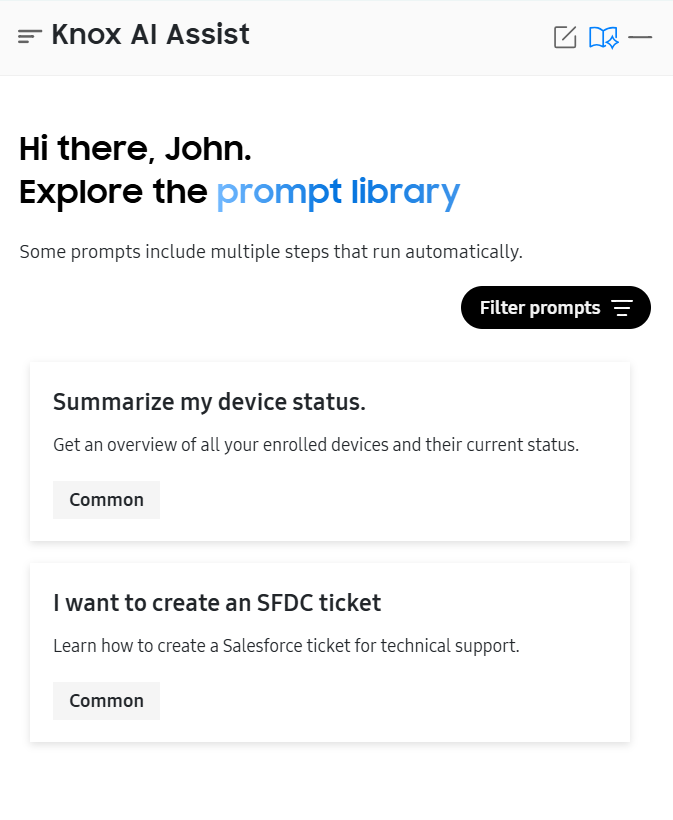
You can optionally Filter prompts by the following categories:
- Common: General queries about your devices and Knox cloud services.
- Enrollment: Queries relating to device enrollment and enrollment profiles.
- License: Queries relating to Knox license keys, license seats, and license usage.
- Firmware update: Queries relating to Knox E-FOTA campaigns and firmware trends.
- Intelligence: Queries relating to Knox Asset Intelligence dashboard insights and device diagnostics.
Select the prompt you’d like to use, and Knox AI Assist will automatically process your query. Some prompts include multiple steps that run automatically.
Knox AI Assist adheres to role-based access control — it can only retrieve information and perform actions available to the admin. As such, the prompt library only displays queries available to you. If you don’t see one of the prompts listed, reach out to your super admin to obtain the appropriate permissions to view or perform the associated prompt action.
Common
General queries about your devices and Knox cloud services.
| Prompt | Description |
|---|---|
| Summarize my device status. | Returns a summary of your devices added to Knox Asset Intelligence, Knox E-FOTA, and Knox Mobile Enrollment. View device counts, enrollment states, and actionable items that require your attention. |
| I want to create an SFDC ticket | If you’re experiencing technical issues, use this prompt to start the process of creating a Salesforce support ticket. |
Enrollment
Queries relating to device enrollment and enrollment profiles.
| Prompt | Description |
|---|---|
| How many devices are enrolled in DO/PO mode? | Returns the number of devices currently enrolled in Knox Mobile Enrollment as a fully managed device (device owner (DO) mode) or a device with a work profile (profile owner (PO) mode). |
| How many profiles do I have in my tenant? | Returns the total number of enrollment profiles configured in your account. |
License
Queries relating to Knox license keys, license seats, and license usage.
| Prompt | Description |
|---|---|
| Summarize the license status in my tenant. | Returns a summary of all your Knox licenses, including license count, distribution by service, and details for any licenses currently in use. |
| Show me the licenses that are going to expire in 3 months. | Returns a list of active licenses expiring within the next three months. |
| Why did the Knox license fail to activate on device? | Use this prompt to troubleshoot license activation failures on a specific device. Enter the affected device’s IMEI or provide the name of the license. Knox AI Assist will attempt to identify the cause of your issue and recommend an appropriate resolution. |
| We are receiving an ‘Out of Licenses’ message, and new devices are failing to enroll in the Knox Suite services. | Use this prompt to troubleshoot out-of-license errors. |
Firmware update
Queries relating to Knox E-FOTA campaigns and firmware trends.
| Prompt | Description |
|---|---|
| Summarize all my campaigns | Returns an overview of all your firmware update campaigns and their current status. Use this to quickly identify campaigns that require attention or aren’t progressing as expected. |
| Which campaigns block the factory reset? | Returns a list of firmware update campaigns with factory reset block enabled. |
| Why are some devices not downloading their E-FOTA update? | Use this prompt to troubleshoot issues preventing devices from downloading their firmware updates. |
| Diagnose why the firmware update is failing and suggest a solution. | Use this prompt to identify why your firmware update is failing, and propose a potential resolution. |
Intelligence
Queries relating to Knox Asset Intelligence dashboard insights and device diagnostics.
| Prompt | Description |
|---|---|
| Summarize device status in KAI | Returns a summary of the top 100 devices added to Knox Asset Intelligence. View key insights, including device enrollment status and hardware and software distribution. |
| Give me a report on the average battery life and current battery levels for my devices. | Returns a report on battery insights for your top 100 devices, including battery health, status, and the number of devices with low battery or missing battery data. |
If you’re unable to find what you need in the prompt library, you can enter your own query into the chat box. To learn more about Knox AI Assist’s supported capabilities, see Retrieve data.
On this page
Is this page helpful?