Knox Authentication Manager v1.11 release notes
Last updated June 17th, 2026
New
Support for Samsung DeX
Knox Authentication Manager v1.11 now officially supports Samsung DeX. Device users can sign in to DeX-enabled devices with their Knox Authentication Manager credentials for a seamless desktop-like computing experience.
The following DeX modes are supported:
- Touch pad/Keyboard: Connect device to a monitor and use it as a touchpad or keyboard.
- Dual mode: Set up dual screens to use device independently for multitasking.
This feature is available for devices:
-
Running Android 14 OS or later.
Devices running Android 14 or 15 only support Classic DeX.
-
With one of the following UEM or EMM configurations:
- Omnissa Workspace ONE without launcher login screen
- Microsoft Intune without Managed Home Screen
Enforce periodic PIN changes
For enhanced device security, you can now enforce periodic PIN changes on devices, requiring device users to change their PIN after specified time periods.
Use the new Force Pin change time (days) policy to specify the number of days after which device users must change their PIN. To further strengthen device security, device users can’t reuse their last three PINs, eliminating credential reuse.
Updates
Security improvements for personal and sensitive data
Device users are now guided to grant Knox Authentication Manager the All files access permission, enabling automatic cleanup of files and app data (such as photos, temporary files, and downloads) upon sign out. This ensures removal of personal data between user sessions.
Moreover, additional security measures for data transmission with Google Firebase are also implemented to ensure all user data remains protected during device syncing.
Autofill credentials in Google Chrome
This release resolves a previous limitation where device users couldn’t use Knox Authentication Manager to save and autofill credentials in Google Chrome.
With Knox Authentication Manager v1.11, device users are directed to enable third-party autofill services in the Knox Authentication Manager app.
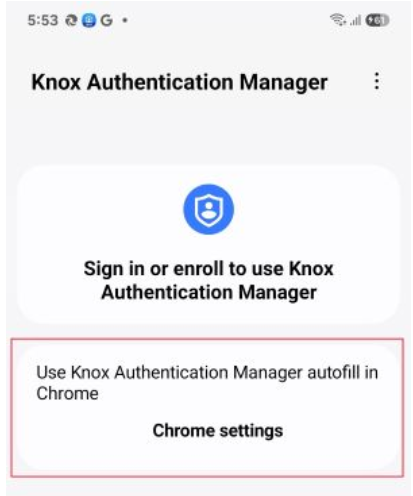
For more information, see How to autofill credentials in Google Chrome using Knox Authentication Manager.
On this page
Is this page helpful?